Support
Setup help for Apple Ads, App Store Connect, AI, iCloud sync, widgets and the weekly email. ASO Intelligence is built by one person at Tanooki Studios, so write in and you are talking to the person who made it.
How do I connect Apple Ads?
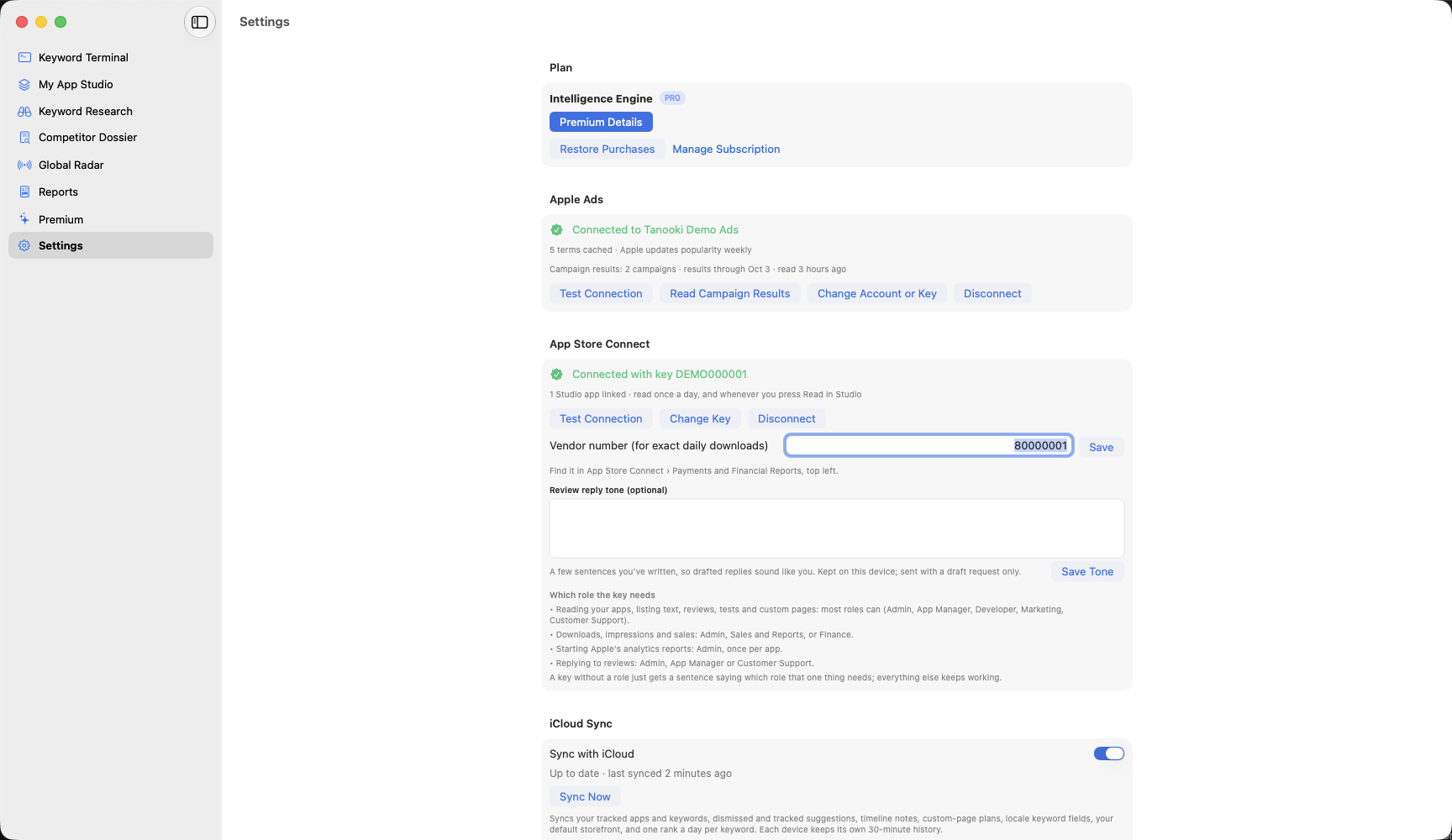
Apple Ads (formerly Apple Search Ads) publishes Apple's own search popularity for App Store search terms: a 1 to 100 score overall and within a genre, updated weekly. Connect your account in Settings and ASO Intelligence shows those scores in place of its estimates.
You need the Intelligence Engine and an Apple Ads account. Creating an Apple Ads account costs nothing, though Apple may ask for billing details during setup; check Apple's current terms at ads.apple.com. Your credentials are stored in your device's Keychain and are only ever sent to Apple.
- Create an Apple Ads account. Sign in at ads.apple.com with your Apple Account and set up an account. It is free, and you do not need to run a campaign.
- Add an API user. In Apple Ads, open Settings, then User Management, and invite a user with an API role. Accept the invitation; that user is who ASO Intelligence signs in as.
- Make a key pair. In ASO Intelligence open Settings, then Apple Ads, and choose Generate Key Pair. The private key goes straight into your Keychain. Copy the public key. You can also import an existing key.
- Upload the public key. Signed in to Apple Ads as the API user, open Settings, then API, and paste the public key. Apple then shows a Client ID, Team ID and Key ID.
- Paste the IDs. Paste all three into ASO Intelligence.
- Test the connection. Choose Test Connection and pick your ad account. Done.
Running campaigns? Your paid impressions, taps, installs and spend are read once a day and appear next to organic rank in Studio, under Keywords. Choose Read Campaign Results in Settings to fetch them now. The first read covers the last 90 days.
Prefer to make the key yourself? Run this in Terminal and upload public.pem:
openssl ecparam -genkey -name prime256v1 -noout -out private.pem
openssl ec -in private.pem -pubout -out public.pem
If the test fails
- Invalid client or signature: the IDs or key do not match. Check the Key ID and that you uploaded the public half of this key.
- Key not recognized yet: Apple can take a few minutes to accept a newly uploaded key. Wait, then test again.
- No API access: the user you signed in with does not have an API role. Check Settings, then User Management, in Apple Ads.
- Rate-limited: Apple is throttling requests. Cached scores stay put and Settings shows when it will retry.
How do I connect App Store Connect?
With your own App Store Connect API key, ASO Intelligence shows your real impressions, product page views, conversion and downloads, replies to reviews, and plans your keyword fields for every language a storefront searches.
You need the Intelligence Engine and access to App Store Connect. The key is stored in your device's Keychain, as a local item that does not sync, and is only ever sent to Apple. It never passes through our server. ASO Intelligence reads your listing and never changes it.
- Make a key. In App Store Connect open Users and Access, then Integrations, then App Store Connect API. Under Team Keys choose the + button, name it ASO Intelligence and pick a role (see below).
- Download the .p8 file. Apple lets you download it once. Keep it somewhere safe.
- Import it. In ASO Intelligence open Settings, then App Store Connect, and import the AuthKey .p8 file. The key ID fills in from the file name.
- Paste the issuer ID. It is at the top of the Integrations page. Add your vendor number too (Payments and Financial Reports, top left) for exact daily downloads.
- Test the connection. The app lists your apps and links each one to your Studio app with the same bundle ID. Apps not on the App Store yet can be added to Studio straight from the list.
- Start Apple's reports. In Studio, open an app's App Store tab and choose Start Apple's Reports, once per app. Apple delivers the first report a day or two later.
Which role the key needs
- Reading apps, listing text, reviews, tests and custom pages: Admin, App Manager, Developer, Marketing or Customer Support.
- Downloads, impressions and sales: Admin, Sales and Reports, or Finance.
- Starting Apple's analytics reports: Admin, once per app.
- Replying to reviews: Admin, App Manager or Customer Support.
If something doesn't show
- "This app isn't on the App Store yet": Apple has no downloads or impressions until a version is live.
- "Waiting for Apple's first report": reports start a day or two after you start them.
- "Apple withheld this day for privacy": Apple leaves out days with very few events. Downloads from sales reports are still exact.
- "This key's role can't…": the sentence names the role that one action needs. Everything else keeps working.
- "Apple turned this key down": the key was revoked, or the issuer ID and key ID belong to a different key.
How much AI do I get?
Intelligence Engine has unlimited AI, fair use applies. Core Tracker includes 10 quick AI uses a month. The features page says which AI features each plan has.
- Fair use: there's a monthly limit to stop abuse. Normal use never gets near it. If it's ever reached, the app says so and AI pauses until the 1st (UTC).
- Core Tracker's 10 quick uses cover AI keyword insights and AI keyword suggestions, and reset on the 1st. Settings, then AI, shows how many are left this month.
- One allowance: every device on the same Apple Account, or the same direct license, shares one month of AI.
- Failed requests: if an AI request fails on our side, it isn't counted.
iCloud sync, widgets and the weekly email
In the current beta, widgets and iCloud sync work. The weekly email is switched on in a later build, and until then the app says so in Settings.
iCloud sync
Turn it on in Settings, then iCloud Sync, on each device. It needs Intelligence Engine and a device signed in to iCloud. It syncs your tracked apps and keywords, tracked and dismissed suggestions, notes, custom page plans, keyword fields, your default storefront and one rank a day per keyword. Each device keeps its own more detailed history. When two devices change the same thing, the later change wins on both.
Your Apple Ads and App Store Connect keys never sync, so connect each device separately. If iCloud is full or you're offline, changes wait on the device and sync later; nothing is dropped.
Widgets
Add Biggest Moves, Keyword Rank or Global Radar from the widget gallery. They update after every refresh and always show when their numbers are from. If they're old, the widget says so and asks you to open the app. Core Tracker's widgets show your first Studio app; Intelligence Engine's show them all.
Weekly email
In Settings, then Weekly Email, enter your address and open the confirmation link we send. Nothing is sent until you confirm. From then on, the first of your devices to run on Monday morning sends that week's email. If none of them runs that week, no email goes out. Every email has an unsubscribe link that works straight away, no sign-in needed.
The TestFlight beta
ASO Intelligence is in TestFlight with friends and family before it goes to the App Store. Ask to join.
- Install Apple's TestFlight app, then open the invite on your Mac, iPhone or iPad.
- Beta copies have an Unlock everything switch in Settings that turns on every Intelligence Engine feature for free, and get unlimited AI (fair use). The switch is removed before release.
- Purchases inside TestFlight use Apple's test environment and aren't charged.
- Found something wrong? Send feedback from TestFlight, or write in.
Common questions
How many Macs can use my license?
A direct-download license covers 2 Macs. On a third, the app lists the two Macs already using it and lets you deactivate one from there, no email needed.
App Store subscriptions are managed by Apple and work on every Mac, iPhone and iPad signed in to your Apple Account.
How do I restore my purchase?
App Store versions: open Premium and choose Restore Purchases, signed in with the Apple Account you subscribed with.
Direct Mac download: your license key is on the page you land on after paying, with an Open in ASO Intelligence button that activates it. You can also paste it under Already have a key? on the Premium page. The key renews itself while your subscription is active. Lost it? Write in with the email on your Stripe receipt.
How do I cancel, and what happens to my data?
App Store subscriptions are canceled in your Apple Account subscription settings. Direct licenses can be canceled from the link in your Stripe receipt, or write in and it gets done for you.
Pro runs to the end of the period you paid for. After that, extra apps, keywords and countries are paused, not deleted, and come back if you resubscribe. Core Tracker keeps 90 days of rank and metric history, so anything older than that is removed.
Why do some popularity scores have a ~?
The ~ marks an estimate built from App Store search signals. With Pro and a connected Apple Ads account, keywords show Apple's own popularity score instead, and lose the ~. Apple updates those scores weekly, and a term Apple has no score for stays estimated.
Why does my iPhone refresh less often than my Mac?
On iPhone and iPad, iOS decides when apps may refresh in the background, based on battery and how you use the phone. The once-a-day and 6-hour schedules are Mac promises. Pull down on a list to refresh now; the app always shows when its last refresh ran.
Why do my other countries only update once a day?
Apple limits how often any app can search the App Store, to about 1,000 searches an hour. Your main storefront gets the regular schedule, and extra countries, top charts and featured checks run once a day so everything fits. Settings, then Refresh, shows the math for your own setup.
How accurate are download estimates and rank predictions?
They're estimates, and the app says so. Downloads are always a range with what it's based on, and it narrows once your own App Store Connect numbers calibrate it. Rank prediction picked the right band about 6 times in 10 when checked against Apple's live results, and says "can't predict" when a keyword's results don't follow the usual signals.
Get in touch
A bug, a question about your license, an idea. Replies usually within a day or two.